League of Legends · Windows companion

You already know what to work on. Clutch keeps it in front of you.

One focus before you queue. One plain line about the moment while you play. And after the game, the evidence — your timeline, your deaths, what you were holding when it went wrong.

Free right now · Windows 10/11 · sign-in required

Clutch's Prepare screen: one focus for the next game, the plan behind it, and recent matchups.
1 The one thing you're practising, written before you queue. 2 Your own recent games, with what you were trying to do.

Free right now — no card, no ads

Reads Riot's official local API, read-only

No overlay required, no admin rights

Replays and voice notes stay on your PC

The gap

Knowing isn't the problem. Noticing is.

You already know the thing you do wrong. The chase at 60% health. The wave you leave the moment you get a kill. The 1,700 gold you're still carrying when you die.

Clutch doesn't try to teach you League, and it won't tell you what to do. It holds one goal in front of you, says one line at the moment that goal is at stake, and then shows you what actually happened — including the parts where the data isn't good enough to say anything.

How it works

One loop, three moments.

Everything in Clutch serves the same cycle: decide what you're practising, be reminded of it while it matters, and look at what happened afterwards.

  1. Before you queue· Prepare

    Write down one thing.

    Your focus for this game, how you'll win your lane, how your team wins the game. It's attached to the match, so afterwards you're reviewing the game you meant to play.

  2. While you play· one line

    Get the situation, not an order.

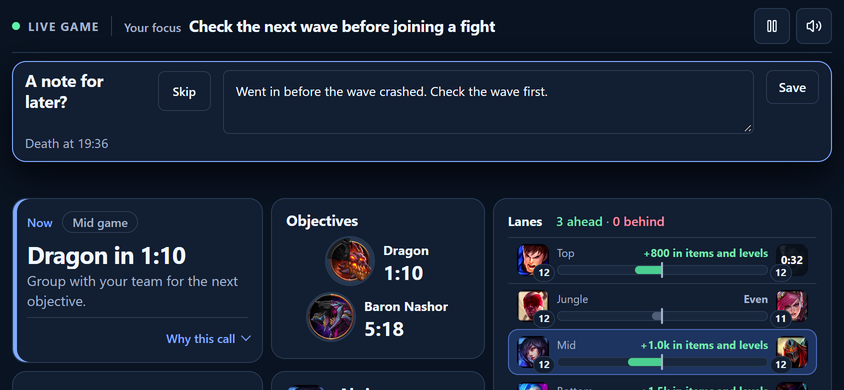
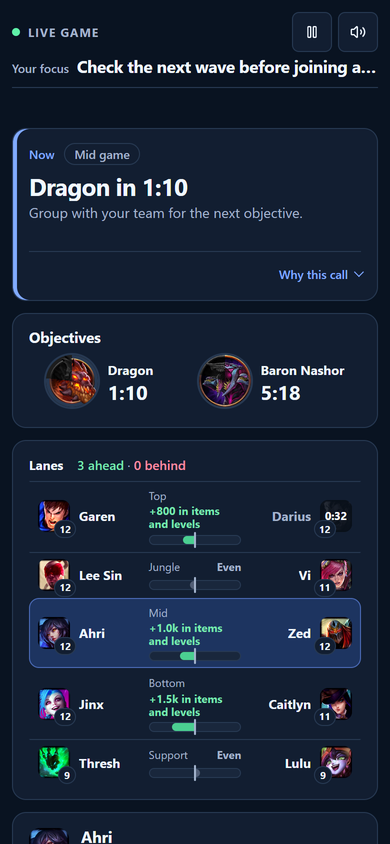
    “Dragon in 70 seconds.” “You're holding 1,700 gold.” “Your team is up a player for the next 20 seconds.” Descriptions of what's true right now — the decision stays yours.

  3. After the game· Review

    Look at the evidence.

    Your curve, your deaths, what you were holding when you died, what followed. Facts first, and your own words kept separate from them.

Reminders

One line at the moment it matters.

Most advice arrives when you can't act on it — in a video, or in a scoreboard after the fact. Clutch's reminders arrive while the situation is still changeable.

  • Your personal focus
  • Objective timers
  • Gold you're holding unspent
  • Numbers advantage
  • Farming pace vs your own usual

Honest caveat: some reminders are estimates — wave timing and early objective leads are calculated, not detected. Each one is independently switchable, and Settings shows how it has landed for you (useful, late, noise). Nothing changes on its own.

A death note being written inside Clutch's match timeline, on the event where the death happened.

Write it while it's fresh. It comes back before your next game.

Review

Review the game, not the number.

KDA tells you it was fine. Clutch shows you the rest: cumulative CS and gold with your deaths and the objectives marked, your lane gold against your lane opponent, your item timings against your own usual first item, and what you were holding when each death happened.

Event order does not establish a cause.

That's the caption Clutch puts on the three minutes after a death. It also lists the reminders it deliberately held back, with the plain-word reason — silence is a decision, and you get to see it.

Clutch's match timeline for a won game: CS and gold over time, deaths marked, and lane gold compared with the opponent.

A won game, reviewed properly — not just a green row in a list.

Progress

68–76 CS/min is your usual. Tonight: 63.

Comparisons come from your own games — same champion, role, queue and patch — and the sample size is printed next to the number. Not a tier list, not someone else's benchmark.

Each week Clutch offers a strength, a recurring risk and one small thing to try next, each with its coverage and a “low confidence” label when that's the honest answer.

Missing games stay missing. They are never counted as zero.

Clutch's Progress screen: last seven days compared with the previous twenty-eight, a recurring risk and a suggested next experiment.

A strength, a risk, and one thing to try — with the sample sizes shown.

Boundaries

What Clutch won't do.

A free app that reads your game should be able to say exactly what it doesn't touch. This is the list.

Where your data lives

Two lists. They don't overlap.

In your account

Your goals, plans, brief death notes, self-ratings and match tags — plus the Riot match summaries and timelines you import so you can review games you didn't run Clutch in.

On your device only

Replay files and their metadata, voice recordings, the local match recorder's database, and reminder diagnostics. These are never uploaded.

Never

Other players' detailed telemetry. Opponent vision is discarded before it reaches storage. There's no separate web account to manage, and no data broker at the end of this.

Requirements

What you need.

Windows
10 or 11, 64-bit
League
running while you play
Sign-in
a Clutch account, free
Connection
required — there's no offline mode

Build status

Beta build

Version
—
Published
—
Size
—
SHA-256
—

The first beta build is being prepared. When it's ready, this page carries its version, date and checksum.

Questions

The ones people actually ask.

Is this allowed? Will it get me banned?

Clutch never reads the game's memory and never sends input to the League client. While a match is running it reads Riot's own local, read-only data — the same game client API — and it never automates anything in the game. There's no “Riot-approved” sticker on this page, because that isn't ours to claim; what we can tell you is precisely what the app does and doesn't touch.

Does it need my Riot password?

No. There is no password field anywhere in the product, and Clutch never sees your Riot credentials. You sign in to a Clutch account, and your Riot ID is what ties matches to you.

What exactly gets uploaded?

The split is on this page in full: goals, plans, notes, ratings and imported match summaries live in your account so they can follow you between installs. Replays, voice recordings and the local recorder stay on your machine. Other players' detailed telemetry is never collected, and opponent vision is discarded before anything is stored.

Does it change my game, my settings or my FPS?

It doesn't touch your graphics settings, doesn't inject input and doesn't need admin rights — the app runs non-elevated, with no install-time prompt. And nothing is drawn over your game unless you deliberately enable an overlay. We won't quote you an FPS number: performance in real games is still being measured, and an unmeasured number doesn't belong on this page.

Why is it free?

Because it's early. No card, no ads, no data sold. Treat it like an early build — expect rough edges, expect things to change, and expect the changelog to tell you what changed.

Can I take my data with me?

Yes. Your coaching data and match stats both export as JSON, and goals archive instead of vanishing. In-app deletion isn't built yet — that lands before we open beyond this beta, and until then exporting is the honest answer.

Your next game. A better perspective.

Set one thing to practise. See the evidence afterwards.

Free right now · Windows 10/11 · sign-in required